The Game Director
The Game Director is the AI you make a game with. You say what you want; it proposes the change, checks it, and waits for you to approve it.
It reads the game, writes the change as documents and runs the checks on it before you see it. Nothing changes until you approve. It never writes code, never runs a program of its own, and can never mark its own work as passed: the checks do that.
The Director is Claude, Anthropic's model, and it runs on your own account. There are two ways in, and you can use both on the same game.
In the Studio, with your own API key
The Director in the Studio runs on the Anthropic API with your
own key. The first time you open a game with no key kept, the Director panel asks for one: paste
it (it starts sk-ant-) and press Keep.
The key is kept in your system's keychain: the macOS keychain, the Windows credential vault, or
your Linux desktop's keyring (the Secret Service). On a Linux desktop with no keyring it goes in a
file only you can read, ~/.config/gamewright/anthropic-key. The panel says which. The key only
ever travels to the core on its input, never on a command line another program could read, and
only the Director's turns use it. If ANTHROPIC_API_KEY is set when the Studio starts, it uses
that instead.
The same key can be managed from a terminal, with the gamewright command line that came with
the Studio (installing says where it is):
gamewright key status     # whether a key is kept, and where
read -rs key && printf '%s\n' "$key" | gamewright key set; unset key
gamewright key forget     # remove it
What it costs. Each turn is billed to your key at Anthropic's prices, and stops at the budget you set in Settings (50 cents, 1, 2 or 5 US dollars; 2 to start): past it, the Director is told to say where things stand and stop. The cost of each turn shows at the foot of the panel. The conversation stays in Anthropic's prompt cache for an hour, so a turn after you have played for a while reads it back at a tenth of the price. With Claude Code signed in with your Claude account, Settings ▸ What it runs on ▸ your Claude plan runs the turns on your plan instead, with no key.
A turn. Type what you want and press Enter. The answer streams in as it is written. Each tool
the Director uses shows as a grey line with what it found. Each change it proposes becomes a
card: its title, why, each field from what it was to what it would be, and what the checks
found. Approve writes the change into your game, bakes it and plays it; Reject asks what
should change, and the Director hears your answer. Watch it play draws the run its checks
played, frame by frame, and a proposal the Director previewed shows its pictures on the card.
An approved change has Undo (and then Redo) on its card, and Ctrl+Z takes back the last
proposal you approved as it does your own edits. In Settings, Its changes apply ▸ When every
check passes applies a proposal as soon as its checks pass, with Undo on its card; one that fails
a check still waits for you. The conversation is kept in your game's folder
(.gamewright/director/studio.json), so the next turn goes on from it.
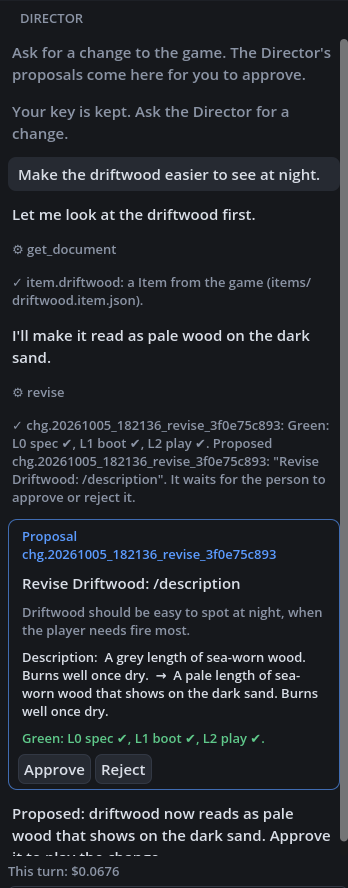
A turn in the Director's panel: the request, each tool as a grey line, the proposal with the field it changes and its checks, and what the turn cost. From the Studio's own test, against a scripted stand-in for the Anthropic API.
The Director in the Studio has every tool but the ones that decide: approving, rejecting, undoing and locking are yours, on the Studio's buttons.
With your own Claude Code, over MCP
If you use Claude Code, it can be the Director instead, on your own Claude plan: no API key needed. Gamewright serves the Director's tools to it over MCP. With the game open in the Studio, choose Director ▸ Connect Claude Code…: it copies the one command that adds the server, with the paths of your Studio and your game in it (the key card shows it too). Paste it in a terminal in your game's folder, once, then start Claude Code there. On macOS, for Tideline, it is much like this:
cd ~/Documents/Gamewright/Tideline
claude mcp add gamewright -- "/Applications/Gamewright Studio.app/Contents/MacOS/gamewright" mcp --pack ~/Documents/Gamewright/Tideline
claude
Claude Code then has the same tools as the Director in the Studio, and the Director's playbook as its instructions. It also has the deciding tools, marked as destructive so Claude Code asks you before it runs one, and each says to use it only when you have asked in your own words.
What it proposes waits in your game's folder. Open the game in the Studio and each proposal shows as a card for you to approve or reject, the same as the Studio's own Director's. The Studio looks again each time its window comes back to the front. Or decide from a terminal:
gamewright changes list --pack ~/Documents/Gamewright/Tideline
gamewright changes approve <id> --pack ~/Documents/Gamewright/Tideline
gamewright changes undo <id> --pack ~/Documents/Gamewright/Tideline
Gamewright Studio never asks you to sign in with your Claude account: Anthropic's terms do not let a third-party app offer that. Your key, or your own Claude Code, is how the Director runs.
In the web Studio
The Studio at gamewright.diy/app has the same Director, on your own Anthropic key, which Gamewright's computer keeps sealed for you. Claude Code cannot connect to it there, since no core of it runs on your computer. A computer of your own paired as a runner can run its games' Director turns on your Claude plan, through Claude Code signed in there: installing says how.
What it remembers
Each turn starts with what happened since the last one: what you approved, rejected (and why),
undid or changed yourself, and how your own plays went (how long, how they ended, how you died and
what you did most). It keeps short notes about the game and you, such as what you like, what to
avoid and why you turned something down, and reads them at every turn, in every conversation. The
book in the Director panel's header shows its notes: change or remove any. They are kept in
.gamewright/director/memory.md.
A big game: a plan first
Ask for something big ("five nights, each harder, and a storm to end it") and the Director first proposes a plan: the steps to get there, each one you can play, each with the playtests that will prove it. Approve it once. The game's Overview shows where the plan stands and offers Continue the plan, which asks the Director to build the next step. A step is marked done only when its playtests pass on the game as you approved it; the Director can't mark its own work done.
A new game from nothing
Start one with New game ▸ From nothing in the Studio (or give --pack a new, empty folder when
you add the server to Claude Code) and the Director starts with the brief. It asks what the game
is,
then the questions of the template that fits (each template has its own), and
proposes a brief: a pitch in one sentence, two or three pillars, the core loop and how big the
game may grow. Then it pins a template, and the game is playable from that step on, with the
template's placeholder content.
It stops for you at three checkpoints:
- The brief and the template. Nothing is built before you approve them.
- The first playable. You play it. When you tell it you have, it records that, and only then does the look open.
- The look and content, on a contact sheet of pictures the engine drew.
In its first acceptance run, a Claude Code Director with only these tools made Nightcoast from one sentence in nine turns. The Director's runs tell each game it made, turn by turn.
What it can and cannot do
Before it promises a new game or a big change, it checks your words against what the engine does, then tells you what it can make as asked, what it would approximate and how, and what can't be made yet. It can play the game itself, a few moves at a time, to see how something plays before it says it works.
It works only through its tools: reading the game, proposing changes, running
the checks, drawing previews. It builds from the engine's vocabulary: the kits and
what they offer. When a game needs something no kit can do, it says so and files a KitRequest:
the engine grows by reviewed kits, never by code inside one game.
Every proposal runs the checks before you see it, on the game as it would be and as it is, so a change that breaks something that worked says so at the top. A change to only how the game looks or sounds must leave play exactly as it was, or it comes back red.
The Director's playbook is what it reads before it starts.